Weather the Trip
- 3.5
- Rating
- 10.00K
- Installs
- Free
- Price

 Analysis by App-foxy
Planning a long drive is different from checking whether it will rain this afternoon. A normal weather app is usually built around one place, while Weather the Trip is aimed at the route itself. I found that distinction useful when thinking about road travel: the weather at departure can be comfortable, yet the conditions several hours ahead may be completely different. This app, developed by Witt Software, is designed to help bring those points into one travel-focused view.
My overall impression is that it makes the most sense for people who regularly drive between cities, plan scenic journeys, or want to examine weather along a route before leaving. It is a free weather app for everyone, although optional in-app purchases range from $2.99 to $20.23 per item. That combination makes it easy to try, but it also means I would spend time testing the basic experience before deciding whether any paid option is worthwhile.
How I judged it for real road-trip planning
I approached the app as a decision tool rather than as another source of daily icons. The important question is not simply whether it shows a forecast. Most weather services do that. The more useful question is whether it helps me decide when to leave, where a journey may become uncomfortable, and whether I should adjust a planned stop.
You May Also Like

 Pandora - Music & Podcasts
Pandora’s Music Is Easy to Start, but Harder to Recover
Pandora’s strength is its low-effort path from a seed to a station. Its weak spot is how much confidence it asks you to place in connection, setup, and quiet recovery.

 AccuWeather: Weather Radar
AccuWeather Review: A Quick, Clear Forecast for Everyday Decisions
For everyday plans, the best forecast is the one you can understand quickly. AccuWeather makes rain timing, radar, and local conditions easy to act on, with a few trade-offs.

 Hill Climb Racing
Why Hill Climb Racing Still Turns Crashes Into One More Run
A tiny car, a bumpy hill and one more upgrade: Hill Climb Racing keeps resurfacing because its simple chaos makes every near-miss feel personal.

 AliExpress - Shopping App
AliExpress Makes Global Shopping Feel Personal, but Shoppers Bear the Risk
AliExpress turns a global marketplace into a pocket-sized discovery engine. Its reach is useful, its shopping loop compelling, and its trade-offs easy to miss.

 Lords Mobile: Kingdom Wars
Lords Mobile Is a Kingdom-Building Routine, Not a Quick Match
A case-by-case verdict on the building, battles, device demands, and social commitments that make Lords Mobile rewarding for some players and exhausting for others.

 PDF Scanner app - TapScanner
TapScanner Makes Paperwork Easier to Capture, Check, and Share
TapScanner makes scanning with a phone feel less like a rescue operation and more like a dependable step in getting work done. Its capture tools are useful, though not flawless.
More From Our News Desk
View All News


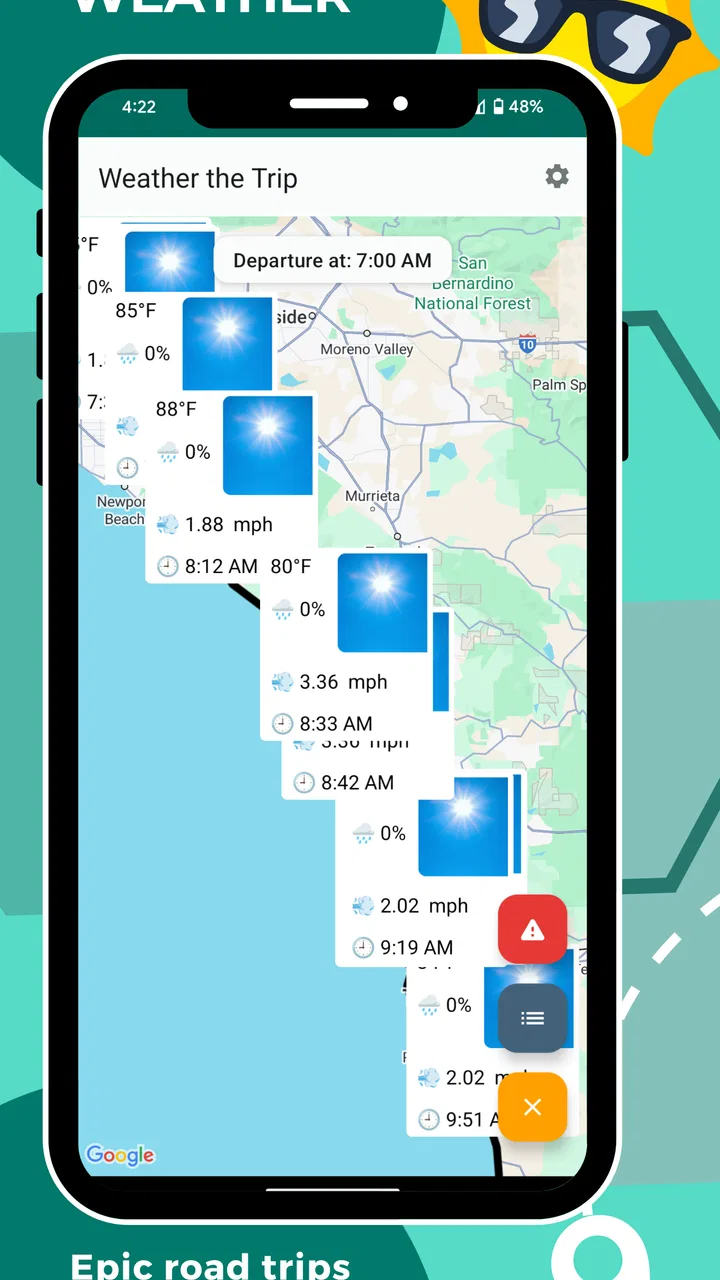
That route-based viewpoint is the app’s clearest identity. Instead of checking one town, then searching for another, I can think about the journey as a sequence of changing conditions. This is particularly valuable on drives that cross regional boundaries, where the weather at the beginning and end of the trip may not tell the same story.
I also considered how much effort the app adds to a normal planning routine. A useful road-trip tool should not force me to become a meteorologist. I want enough detail to spot a problem, but I do not want an overloaded screen that makes a simple departure decision harder. The balance between route context and readable information is therefore more important here than the number of decorative weather elements.
The app is available for Android devices running at least version 12 of the operating system. That requirement is worth checking before planning around it, especially if an older phone is being used as a dedicated navigation or travel device. On a compatible phone, the current release is identified as version 2.50-googleplay, so keeping the installation current is sensible when relying on it during a trip.
A realistic use case: checking a full day behind the wheel
Imagine I am leaving early for a drive that will take most of the day. The first town may show mild conditions, but the route later passes through an area where rain, wind, or low visibility could affect the timing. With a conventional local forecast, I would need to search for several places manually and remember how each forecast relates to my arrival time.
This is where the route concept becomes practical. I can inspect the journey before breakfast, identify the part that deserves attention, and decide whether to leave earlier, add a break, or postpone the drive. The app does not replace common sense or official travel warnings, but it can make the first planning pass much less scattered.
A second useful situation is a flexible leisure trip. If I am choosing between two broad directions, I can compare the weather pattern along each planned journey instead of selecting a destination based only on its forecast. That changes the decision from “Which place looks nicest?” to “Which drive is more comfortable from beginning to end?” For road travel, that is often the more honest question.
What makes the route view more valuable than a local forecast
The strongest benefit is continuity. A local weather screen is excellent when I am staying in one place, but it can hide the transitions that matter during a drive. Weather the Trip is more useful when the trip itself is the subject, not merely the destination.
I also like the way this encourages time-based thinking. A forecast should be read in relation to when I expect to reach each part of the route. Checking conditions without considering arrival time can create false confidence. A clear morning at home does not automatically mean a clear afternoon farther away.
One practical habit I would recommend is checking the route twice: once during planning and again shortly before departure. The first check helps shape the itinerary, while the second helps catch a changing pattern. This two-stage workflow is more reliable than opening the app only after getting into the car, when changing plans is already inconvenient.
Another less obvious advantage is that the app can help separate weather concerns from navigation concerns. A navigation service may be better at traffic, directions, and road closures, while this app can be used specifically to examine weather along the journey. I would not expect it to replace navigation software. I would use both, assigning each one the job it handles best.
Where the app may save time, and where it may not
For a single-location forecast, I do not see a strong reason to abandon a familiar weather service just for this app. If I only need to know whether to carry an umbrella in my neighborhood, a standard local forecast is likely quicker. Weather the Trip earns its place when several locations matter in sequence.
That distinction is important because a route-focused app can feel unnecessary on short or routine journeys. Commuters who travel the same roads every day may already know which local forecast sources they trust. The extra planning perspective becomes more valuable when the distance, timing, or uncertainty increases.
I would also be cautious about treating any forecast as a guarantee. Conditions can change, and a route view may make a complex journey easier to understand without making it perfectly predictable. For severe weather, difficult terrain, or a trip where safety depends on precise conditions, I would combine the app with official alerts and current road information.
The audience rating of Everyone makes the app approachable for general household use. I can imagine a family using it before a holiday drive, with one person checking the route while another handles navigation. Still, the person behind the wheel should not be interacting with it while driving. The best workflow is to review it before departure or during a safe stop.
How it compares with the usual weather alternatives
There are three broad alternatives to consider. The first is a conventional weather app focused on a saved city or current location. That option is usually better for everyday local conditions and quick glances. It may also be more familiar if I already use it for forecasts, alerts, and widgets.
The second is a navigation app with weather information added as a secondary feature. That can be convenient because directions and travel planning live in one place. However, weather may not be the main organizing idea, so it may be less satisfying when I want to compare conditions across a long route before deciding whether to travel.
The third option is a collection of official weather and transport sources. This approach can be stronger when I need authoritative warnings, road restrictions, or highly local information. Its weakness is the amount of manual work: I may need to switch between services, search multiple places, and assemble the route picture myself.
Weather the Trip sits between those choices. It is more travel-oriented than a basic local forecast, but I would still keep navigation and official safety information nearby. Its value is not that it does every travel job. Its value is that it gives the weather portion of a road journey a clearer structure.
Small workflow choices that improve the experience
I would begin with the actual route rather than browsing random destinations. The app becomes easier to judge when I give it a real decision to support: leave today or tomorrow, take the northern route or the southern one, or keep a planned stop despite a changing forecast.
For longer drives, I would make notes about the most weather-sensitive parts of the journey. Mountain roads, exposed stretches, and late-arrival segments deserve more attention than a comfortable first hour. Even if the app presents the route clearly, I still need to interpret what the conditions mean for my vehicle, passengers, and timing.
A useful trade-off is detail versus speed. I would not spend twenty minutes repeatedly refreshing a forecast that will be outdated by the time I leave. A better routine is to use the app for a broad plan, then perform one focused check close to departure. That keeps it helpful without turning weather monitoring into a distraction.
I would also avoid planning the tightest possible schedule around a perfect forecast. If the route looks unsettled, leaving room for a break or delay is more sensible than trying to preserve every planned arrival time. The app helps reveal where flexibility may be needed; it cannot create that flexibility for me.
Free access, optional spending, and the cost of switching
The free price is a meaningful advantage because it lowers the barrier to testing the route-planning idea. I can install it, try it on a genuine journey, and decide whether its way of presenting weather fits my habits before spending anything.
The presence of in-app purchases changes the evaluation slightly. Individual items cost between $2.99 and $20.23, so I would not assume that every useful extra is included in the free experience. Before buying, I would first ask whether the paid addition solves a problem I actually have, rather than paying simply because I use the app occasionally.
That is also where the cost of switching matters. Moving from a familiar weather app means learning a different way to think about forecasts. Moving from a navigation-centered routine means accepting that I may still need another app for directions and traffic. The switch is worthwhile when route weather is a recurring concern, not when I only need an occasional local temperature.
Because the app has an average rating of 3.5 from roughly seventy ratings and thirty-seven written reviews, I would treat it as a specialized tool worth testing personally rather than as an automatic replacement for every weather service. The relatively modest user base also makes my own road-trip workflow more important than relying on popularity alone.
Its installation count is over ten thousand, which suggests that it has found a focused audience without being a mainstream weather standard. I see that as consistent with the product’s purpose: it is not trying to be the universal forecast app for every moment of the day. It is more relevant to people who specifically care about conditions along a journey.
Who should choose it, and who should skip it
I would recommend giving it a serious trial if you frequently take long drives, organize family journeys, travel between cities, or prefer to make weather-aware decisions before setting off. It is especially appealing when the destination forecast alone feels incomplete and the route has several distinct stages.
I would be less enthusiastic for someone who wants a polished everyday weather companion for one home location. A familiar local app may be faster for that job. I would also look elsewhere if my main need is turn-by-turn navigation, live traffic, or official emergency alerts. Those are different priorities, and a route-weather tool should not be judged as though it were designed to replace them.
For occasional travelers, the free entry point makes experimentation easy. For frequent road trippers, the decision depends on whether the route view changes actual behavior. If it helps me choose a safer departure window or avoid an uncomfortable stretch, it has practical value. If I keep opening it only to confirm the same local forecast I already receive elsewhere, it is probably unnecessary.
My recommendation after weighing the trade-offs
Weather the Trip is a focused weather app with a clear reason to exist: it puts the journey, rather than a single place, at the center of planning. I appreciate that approach because it matches how road travel really works. Conditions evolve while I am moving, and a destination-only forecast can leave out the most inconvenient part of the day.
My recommendation is to try it if road-trip forecasting is a genuine need, using a real upcoming route as the test. Check whether the route perspective helps you make a decision faster and with more confidence. Keep a navigation app for directions and official sources for serious warnings, then decide whether the optional purchases add enough value to your routine.
In short, I would choose it as a companion for longer drives, not as my only weather source. Its best quality is its travel-specific viewpoint; its main limitation is that people seeking a simple local forecast may find that viewpoint more elaborate than necessary. For the right user, the route is the forecast context that ordinary weather apps often overlook, and that makes this free offering from Witt Software worth a practical test.
FAQs for Weather the Trip
01What is Weather the Trip and what does it do?
Weather the Trip is a travel-focused weather application designed to help users check conditions before and during a journey. Instead of showing only the weather at your current location, it can be useful for planning destinations, routes, and outdoor activities. Depending on the version and device, the app may provide forecasts, temperature details, precipitation information, wind data, and other travel-related weather insights.
02Can Weather the Trip help me plan weather conditions along a route?
The main appeal of Weather the Trip is its focus on travel planning rather than simple local weather checks. Users should be able to explore weather information for places connected with a trip and use that information to choose suitable dates, clothing, transportation, or activities. However, forecast availability and route features may vary, so it is wise to confirm important travel conditions with official weather and transportation services.
03Is Weather the Trip free to download and use?
Weather the Trip may be available as a free download, but some features can depend on the app’s current pricing model, advertising, subscriptions, or optional in-app purchases. Before downloading, check the Google Play Store or Apple App Store listing for the latest details. Also review whether advanced forecasts, saved trips, ad removal, or additional planning tools require payment.
04Does Weather the Trip require location access?
Location permission may be useful if you want Weather the Trip to automatically identify your current position and display nearby conditions. You can usually choose whether to grant this permission while using the app, allow it continuously, or enter destinations manually, depending on the operating system. If privacy is important, review the permission settings and the developer’s privacy policy before enabling background location access.
05Can I rely on Weather the Trip for severe weather or travel decisions?
Weather the Trip can be a convenient planning tool, but forecasts are not guaranteed and can change quickly, especially during storms or long-distance journeys. It should not be your only source for warnings, road closures, flight disruptions, or dangerous conditions. For serious weather events, compare the app’s information with official meteorological agencies, emergency alerts, local authorities, and transportation providers before making important decisions.
Pros
- Simple interface makes checking trip weather quick and convenient.
- Useful forecasts can help with packing and daily travel planning.
- Location-based information reduces the need to search manually.
- Helpful for comparing conditions before visiting different destinations.
- Compact design is suitable for quick checks while traveling.
Cons
- Forecast accuracy may vary depending on the destination and data source.
- Some features may require an internet connection while traveling.
- Weather details can differ from conditions at your exact location.
- Frequent travelers may find limited customization options restrictive.
- Battery or data usage may increase when location services stay enabled.

Weather the Trip
Gallery